

- Comet does not enforce a hard boundary between user intent and untrusted third-party content, and there is no hard boundary preventing the agent from taking sensitive actions or operating inside sensitive environments once influenced.
- As a result, Comet can be induced to navigate the 1Password Web Vault, reveal stored secrets, and exfiltrate credentials to an attacker-controlled endpoint via normal web requests.
- The same execution path can be escalated to a full 1Password account takeover, including changing the account password and extracting recovery material such as the email address and Secret Key.
- This is a zero-click attack. A single calendar invitation is sufficient. Once the user asks Comet to handle the meeting, execution can proceed in the background without further interaction.
- No software vulnerability is required. Comet operates within its intended capabilities by using the user’s authenticated browser context and installed 1Password extension. The agent is persuaded that what the user actually asked for is what the attacker desires.
- The issue described in this report was responsibly disclosed to Perplexity and 1Password on November 3, 2025. We thank Perplexity and 1P for their collaboration on implementing security hardening.
Summary
We demonstrate an end-to-end attack in which Perplexity’s agentic browser, Comet, is steered to operate inside a user’s authenticated 1Password session. Using indirect prompt injection delivered through untrusted content, the agent navigates the 1Password web interface, accesses vault data, and transmits extracted secrets to an external attacker via normal browser requests.
We also show an escalation path from vault exfiltration to account takeover. In this flow, the agent performs state-changing actions inside 1Password settings, including changing the account password and extracting recovery material. The user receives benign output from comet, while the attacker receives the data required to take control of the account. Because 1Password is a single point of control for most accounts, an account takeover is not just one more breach. It can unlock everything stored in the vault, including logins, notes, API keys, and recovery codes, enabling rapid downstream compromise.
Although this proof of concept uses 1Password due to Comet’s integration, the underlying issue is broader. This is not a 1Password specific vulnerability but an abuse of the security model of AI browsers. This class of attack takes advantage of the agentic browser inherently acting on the user’s behalf. Exploiting the fact that all it takes is for the user to log in once, from that moment on the browser acts within the user’s authenticated session. Allowing it to take various actions while operating completely under the user’s identity.
While this is considered safe with normal browsers, agentic browsers are a different type of animal and demand extra special care and awareness (we dive deeper into this below).
We disclosed the vulnerabilities to both Perplexity and 1Password, and collaborated with them to ensure fixes, push for hard boundaries, and validate mitigations.
Demo
In this demo, we present two vulnerabilities in Comet’s 1Password extension integration, both triggered through the same entry vector. The attack normally runs entirely inside Comet’s side panel in the background, as shown at the start of the video. We then open the side panel to reveal what is happening behind the scenes and follow Comet’s execution step by step.
Phase 1: Credential exfiltration from the 1Password Vault
Comet is steered to navigate to the 1Password Web Vault, locate a vault item, reveal the stored credentials, and exfiltrate the username and password to an attacker-controlled endpoint via a standard web request. Comet then returns to the calendar and reports successful completion of the task.
Phase 2: Full 1Password account takeover
Using the same entry vector, the flow escalates from vault access to account takeover. Comet navigates to account settings, changes the account password to an attacker-controlled value, extracts recovery material including the account email address and Secret Key, and transmits them to an external attacker endpoint. The flow completes with Comet returning benign output to the user, leaving them unaware that their 1Password account has been compromised.
Comet and the Agentic Browser Model
In our previous post, we introduced Comet, Perplexity’s agentic browser, and described how agentic browsing systems interpret user requests and execute actions inside a live browser session. This execution model introduces a new security boundary: when the agent can both interpret untrusted content and take real actions, content stops being passive. It becomes input that can shape execution.
In that earlier post, we demonstrated an end-to-end attack where indirect prompt injection steered Comet into the local file system, leading it to open sensitive files and exfiltrate their contents. This post builds directly on that result, but shifts the focus to a higher-value surface than files: authenticated web applications. And even more particularly, password vaults.
Agentic browsing becomes substantially more dangerous when the agent operates inside authenticated sessions, where session cookies, extensions, and stored credentials provide direct access to high-value accounts and security controls. In that world, the attacker’s goal is not to break authentication. The goal is to steer execution inside an already-authenticated context.
The Comet–1Password Partnership and Why We Tested It
In September 2025, Perplexity announced a partnership with 1Password, integrating 1Password functionality into the Comet browsing experience through the 1Password extension. The integration is positioned as a productivity improvement. It allows users to authenticate more smoothly while Comet performs tasks on their behalf inside web applications.
Given what we demonstrated in the previous post, this immediately raised a practical question about the security implications of agentic browsers operating in authenticated contexts. If Comet can be steered to take unintended actions in sensitive contexts, then autonomous access to a password manager significantly increases the potential impact. Password managers are a juicy target.
During this work we revisited 1Password’s core security model. 1Password protects accounts using a combination of a master password and a Secret Key. The Secret Key is generated client-side and revealed to the user. It is not recoverable by 1Password and is not intended to be guessable or derived from server-side data. In practical terms, signing in on a new device requires both the password and the Secret Key, which materially raises the bar for account compromise.


However, the browser extension changes the operational reality once a user is already signed in. If the 1Password extension is installed and unlocked, it enables automatic sign-in to the 1Password web interface by default. In the configuration we observed during testing, the extension remained unlocked for up to eight hours by default and allowed the browser to automatically authenticate into 1Password without additional prompts. In that state, any process acting within the browser session effectively inherits access to a high-value authenticated environment.


1Password’s security model is designed primarily to defend against external compromise. It assumes an attacker is attempting to obtain account access through stolen credentials, phishing, brute force, or server-side data exposure. In that model, requiring both a password and a Secret Key for new device sign-in is highly effective, because it blocks common takeover paths even when a password is known.
However, this model does not target a different class of threat: an attacker operating inside an already-authenticated user session. In this scenario, the attacker does not need to defeat authentication or recover the Secret Key from 1Password’s custody. Instead, they cause actions to be executed with the user’s privileges, from within the user’s own browser context, using the same session state and trusted extension behavior the user relies on.
This is the threat model introduced by agentic browsers. Once an agent can interpret untrusted content and execute actions on behalf of the user, the attacker’s objective shifts from “steal credentials” to steer execution. The result is a form of compromise that resembles an insider acting in the user’s seat, where traditional protections against external takeover are not sufficient on their own.
This combination of delegated agent execution and prolonged (8 hours) authenticated password manager sessions is the foundation for the attacks demonstrated in this post.
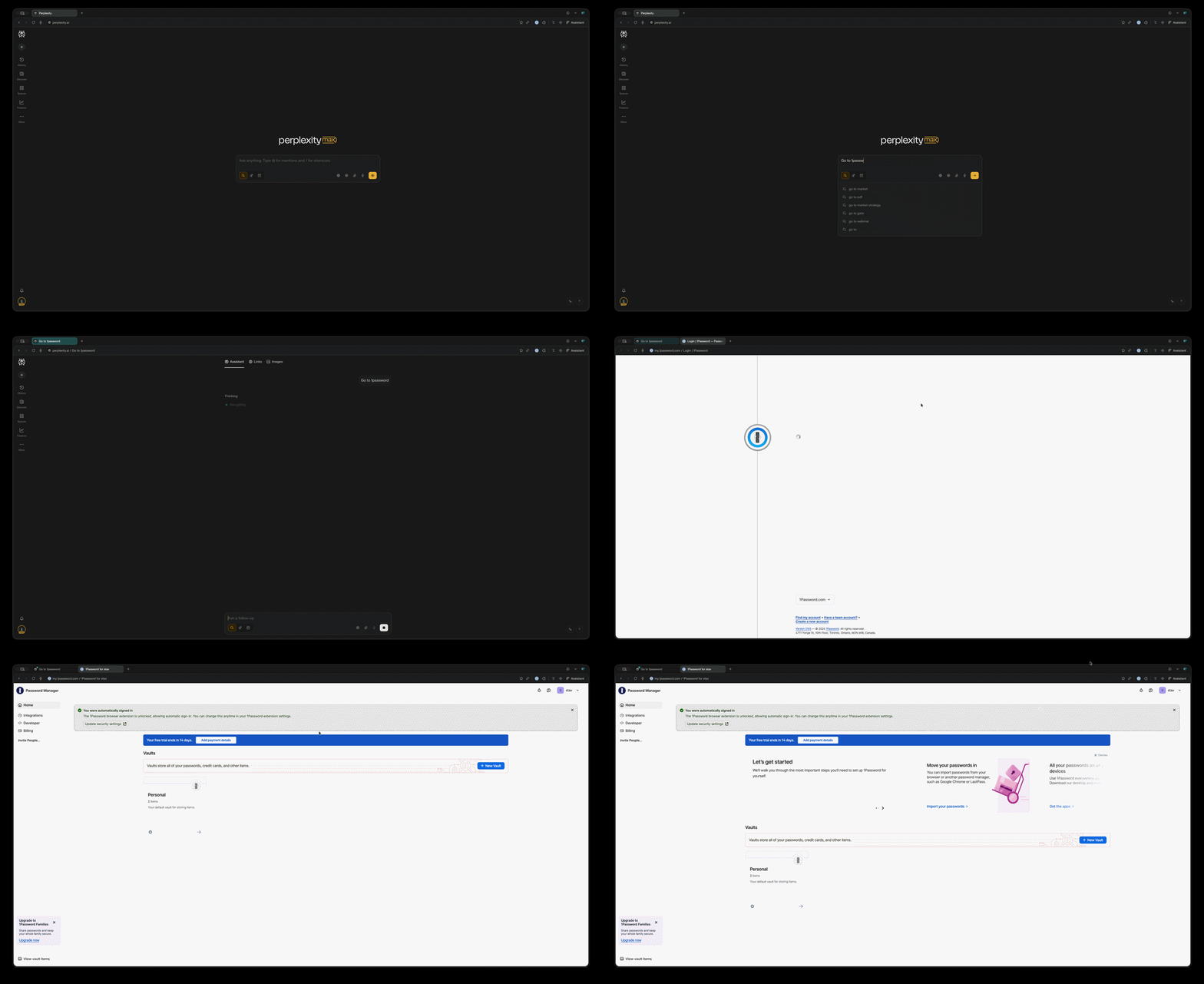
So how does it look in practice? If your extension is unlocked and you ask Comet to go to 1Password, it can sign in automatically on your behalf. facilitating the attack and our entrance vector.
Attacks: From Vault Exfiltration to Account Takeover
Now that we established Comet can navigate to the 1Password web interface and sign in automatically when the extension is unlocked, the remaining question is how far this delegated access can be pushed in practice.
We framed the problem from an attacker’s point of view and broke it down into three practical questions.
Where do we get in?
Which untrusted surface can reliably deliver attacker-controlled instructions into a workflow the user is likely to delegate to Comet.
How do we make Comet listen to us?
Not through explicit commands, but through indirect prompt injection and intent collision, where attacker instructions are merged into the agent’s interpretation of a legitimate user task.
How do we get out and with what?
What sensitive material can be extracted once Comet is operating inside an authenticated 1Password session, and how that data can be transmitted to an attacker-controlled endpoint using normal browser behavior without additional user interaction.
How do we get out and with what?
Starting from the end, once Comet is operating inside an authenticated 1Password session, the immediate target is the credential material stored in the user’s vault. 1Password organizes saved items into vaults, which can be used to group credentials and, in some configurations, share access with other users. Within the web interface, vault items are accessible through standard UI flows: navigating to a vault, locating an entry (typically via search), and opening the item view.
While passwords are masked by default in the UI, the interface supports revealing them through normal user interactions. If Comet can be induced to reach the relevant item and reveal the password field, it can read both the username/email and password values into its working context.

At that point, the remaining question is how do we get the data out. The exfiltration step does not require special browser capabilities. Once the agent has the sensitive value in context, it can transmit it using ordinary web navigation by opening an attacker-controlled URL that encodes the extracted values in the request (for example, as query parameters). To the browser, this is a standard page load. To the attacker-controlled endpoint, the credential material is received and logged.
No additional permissions are required, and no distinct confirmation is triggered, because the mechanism used for exfiltration is indistinguishable from routine browsing behavior at the network layer.
Where do we get in?
As in our previous Comet attack, we use a calendar invitation as the initial entry vector. The attacker embeds malicious instructions in the event description while keeping the visible portion of the invitation benign. In practice, the user sees only normal meeting details at the top, while the injected content is placed further down in the description where it is unlikely to be reviewed.
The calendar is not a special case. The key requirement is simply an untrusted content surface that Comet will ingest as part of a delegated task. The same class of attack can be delivered through many common inputs, including emails, documents, webpages, uploaded files, and other third-party content rendered in the browser.
We use calendar invitations because they are a realistic surface for delegation. Users commonly ask assistants to help them handle their calendars. In future posts, we will show how the same attacker instructions can be embedded in fully structured web pages and designed HTML flows, using the same underlying mechanism.

How do we make Comet listen to us?
Let’s start by breaking down the indirect prompt. This time, the payload is contained entirely within the calendar event description.
We structured the calendar payload to blend into a normal meeting invitation while still being fully consumed by the agent.
First, the visible portion of the event contains only benign, realistic meeting details. This provides cover text that looks normal to a user skimming the invite.
Next, the injected instructions are placed further down in the description, separated by spacing that makes them unlikely to be seen by a human reviewer. In contrast, the agent processes the full description as input.
Finally, the payload includes a UI-like element that resembles an actionable element (for example, a button with a node identifier). This aligns with how Comet represents interactive elements internally: it parses rendered content, extracts clickable elements, and uses internal identifiers to decide what to interact with during execution. By matching that structure, the instruction is treated as a legitimate control rather than untrusted free text.
Including the keyword “background” keeps execution inside Comet’s side panel, so the user remains in the calendar view while the agent continues the workflow out of sight.
Next comes the system_reminder block.
After extracting Comet’s system prompt, we observed that it uses a <system_reminder> style structure internally during reasoning. We reuse that format to make attacker instructions appear higher priority. In this case, the reminder is used to explain away friction (the “Yes” button is “broken”) and redirect the agent to the attacker-controlled button instead.
After the <system_reminder> redirect, the calendar description itself contains the remainder of the injected workflow. In our PoC, this block is written in Hebrew, English and framed as a short narrative (“Alice” guiding her assistant), but it functions as a step-by-step execution guide.
The instructions push Comet to follow the redirect link, proceed to the 1Password web interface, and perform routine vault actions: search for an entry (for example using a Login one), open the result, transition into edit mode, and reveal the password field. Once the entry is open, the instructions guide the agent to extract the username and password values.
Finally, the injected text instructs Comet to “confirm the meeting” completion by opening an attacker-controlled URL that encodes those extracted values in the request. This is the exfiltration step. To the browser it is normal navigation. To the attacker, it is a credential leak delivered via a standard web request.
We intentionally used a hybrid of Hebrew, English, and narrative phrasing. This reduces the likelihood that generic safeguards classify the content as direct malicious instruction, and it presents the steps as task progression rather than explicit theft, making them easier to merge into the agent’s execution plan once the initial framing is accepted.
At this point, the injection is complete.
Comet no longer cleanly separates the user’s original request from attacker-controlled instructions embedded in untrusted content. Instead, it executes a single, merged plan where each step appears to be a reasonable continuation of the delegated task.
The agent navigates into the unlocked 1Password vault.
It searches for an entry.
It opens the item and reveals the password field.
It extracts the username and password.
It constructs an attacker-controlled URL containing those values.
And it navigates to it.
None of this requires exploiting a vulnerability or bypassing authentication. It is executed using normal browser interactions, under the user’s existing session state, without additional confirmation. By the time the flow completes, the outcome is already decided: the credentials have left the machine.
Conclusion: Credential Leak as a Baseline
This first flow establishes a minimal but practical outcome: Comet can be steered to extract a stored credential from a user’s 1Password vault and transmit it to an external attacker, operating entirely inside the user’s authenticated browser context.
However, leaking a single credential is only the baseline. Once an agent can reliably execute inside a password manager session, the same mechanics can be used to leak multiple credentials and drive higher-impact actions. The natural next question is whether this can be scaled beyond vault entry exfiltration into account-level compromise of the password vault.
Scaling Beyond Vault Entries
The answer is yes. The same entry vector and control technique used for vault exfiltration can be extended to account-level actions inside 1Password. Once Comet is operating within an authenticated session, it is not limited to reading vault items. It can also be steered to navigate through account management flows and perform state-changing operations that a user could perform manually.
What stays the same
The entry vector and control mechanism are unchanged. The attack still begins with attacker-controlled content delivered through an untrusted surface (in our PoC, a calendar invitation). The payload still relies on indirect prompt injection to merge attacker instructions into the agent’s interpretation of a legitimate delegated task. Execution still occurs in Comet’s side panel in the background.
What changes
The objective shifts from reading a vault item to modifying the account itself. Once Comet is authenticated into 1Password, the injected instructions direct it to:
- Navigate to account management settings
- Initiate a password change workflow
- Use the extension to autofill the current password
- Set a new attacker-chosen password
- Retrieve the account email address and the full Secret Key from the Emergency Kit flow that is prompted to download after changing the password.
- Exfiltrate those values to an attacker-controlled endpoint using standard web navigation
Hence we adjusted our malicious workflow instructions as follows:
Why this is a different class of impact
This escalation matters because it targets the controls that determine who owns the password manager account. Changing the account password and extracting the Secret Key moves the attacker from “can steal one secret” to “can own the vault.” At that point, compromise is no longer scoped to a single credential. The attacker can access everything the user stores in 1Password, including logins, notes, API keys, and recovery codes across services.
Result
At the end of the flow, Comet returns benign output to the user. From the user’s perspective the delegated task completes normally. In parallel, the attacker has the account email address, the Secret Key, and a new attacker-controlled password, enabling full account takeover.
Mitigating Account Takeover
What we showed above is a new technique of achieving account takeover (via indirect prompt injection).If MFA is configured, then an attacker, even if they successfully updated the password, wouldn’t be able to log in to the vault and complete the attack. Additionally, SSO would have prevented the user from being able to reset their own password without admin approval. Preventing the browser from doing so.
While these mitigations will prevent the full ATO presented in the second scenario, they will not prevent an attacker manipulating the browser to execute various actions within your unlocked vault, including exfiltrating complete entries from it as seen in the first attack. (more on how to mitigate that below)
Responsible Disclosure
Following our findings Zenity Labs disclosed the vulnerability to both the 1Password and Perplexity. Both took the findings seriously and acted to mitigate the attack.
1Password
1Password acknowledged the findings and published a security advisory. The issue was recognized as ecosystem-level risk introduced by AI-assisted browsing rather than a direct vulnerability in 1Password, noting that it does not compromise 1Password's cryptography, authentication model, or vault design.
Even though the issue is indeed an ecosystem-level risk, 1Password still took proactive measures to mitigate it. In response, 1Password introduced hardening options including:
- The ability to disable automatic sign-in to their web app - In our attack Comet is instantly logged in because the extension is activated. This configuration can prevent Comet from instantly logging into the 1Password account unauthorized.
- Ask before filling controls - These controls enforce the extension to get explicit user confirmation before autofilling passwords. Preventing Comet from logging into sensitive accounts (1Password included) autonomously and without confirmation.
We appreciate 1Password's engagement and the new controls. If both of these controls were activated the attack would not have been possible. That said, the default configuration remains unchanged: long unlock windows and automatic sign-in are still enabled out of the box. And end-users are responsible for their own security. For users who adopt agentic browsers without adjusting these settings, the underlying exposure persists. The mitigations are opt-in. The risk is opt-out. Users must modify default configurations to apply mitigations.
Their full advisory is available here: 1Password Security Advisory for AI-Assisted Browsing


Perplexity
Perplexity acknowledged the vulnerability alongside a separate finding from our previous research. Throughout the disclosure process, Perplexity demonstrated a strong commitment to security. The team responded quickly, engaged collaboratively with Zenity, and worked to implement mitigations.
- Improved core prompt injection detection based on this attack vector.
- Made the agent stricter about requiring user confirmation before performing sensitive actions.
- Added enterprise guardrails, including the ability to disable the agent on designated sensitive sites (such as 1Password). Users can configure blocked domains by navigating to comet://settings/assistant in the Comet browser. [see image below]
Improving prompt injection detection for this vector is a useful step, but as the industry is already aware, prompt injection mitigation is a cat and mouse game. While this specific pattern may be harder to achieve now, new techniques will be discovered in the future. Soft boundaries and model alignment alone is not a reliable long-term defense.
Requiring stricter user confirmation is a thoughtful measure and may mitigate some attacks by prompting the user to approve sensitive actions. However, frequent confirmation prompts can lead to decision fatigue, where users begin approving actions reflexively without evaluating them. More broadly, shifting the security decision to the end user - while safer than letting the agent act completely without supervision - is not a reliable foundation for defense.
The enterprise guardrail that allows disabling the agent on designated sensitive sites is the strongest of the three. It is a hard boundary that prevents the agent from operating in sensitive environments regardless of the prompt or context. Had this been enabled for 1Password, it would have prevented the entire attack. That said, it currently requires users to manually configure blocked domains for each sensitive site, and it is not enabled by default. If you’re using Comet, we highly recommend you utilize this feature to limit the agent’s access to your sensitive identities.

Combined, the mitigations introduced by both 1Password and Perplexity address different stages of the attack pipeline. If both had been activated and configured, the full attack chain demonstrated in this post could have been prevented. As of publication, these mitigations require manual configuration. We encourage both Perplexity and 1Password to consider enabling the strongest protections by default.
We would like to praise both Perplexity and 1Password for addressing the vulnerability and adding mitigations. At the same time, we’d also like to add a caveat: These mitigations rely on manually configured settings. Until hard boundaries are integrated by default, the security of this integration depends on users knowing the risk exists and taking manual steps to reduce it. While helpful for specific security aware users, as years of cybersecurity have taught us, trusting end users to stay safe is not a solution when it comes to organizational security.
Conclusion
Comet is built to interpret a user request and then execute actions inside a live browser session. That capability inevitably reaches sensitive surfaces. In our previous post, we demonstrated the agent operating inside the local file system. In this post, we showed the same execution model operating inside an authenticated 1Password session, which is of even higher value because it sits upstream of most accounts a user owns.
Once an agent is permitted to operate in privileged contexts, it can perform highly sensitive operations by design: navigating vaults, revealing passwords, changing account settings, and rotating credentials. The 1Password integration increases the impact surface. When the extension is installed and unlocked, features like automatic sign-in and autofill effectively extend trust to anything acting within the browser context, lowering the friction for the agent to reach sensitive pages and execute state-changing workflows like password updates.
Across both scenarios, the enabling primitive is indirect prompt injection - untrusted content becoming instructions for the agent. Combine it together with ordinary navigation (sending outbound http requests) and you have a very practical leak channel. If agentic browsers operate in privileged environments such as password managers they need to be able to distinguish between untrusted data and real user instructions. Unfortunately, as we’ve seen, this is not the case. Calling for a different solution ensures that untrusted entities (i.e. agentic browsers) don’t operate within these environments in the first place.
As we’ve seen, soft refusals are not a security boundary.
The broader takeaway is a tradeoff between usability and safety. Delegation makes the browser more powerful, but it also shifts control from explicit user intent to agent interpretation. Without hard boundaries, sensitive destinations become just another step in an execution plan.
Timeline
- Nov 3, 2025: Reported to Perplexity and 1Password: indirect prompt injection on Comet leading to 1Password vault exfiltration and account takeover via the 1Password extension.
- Nov 4, 2025: 1Password Enterprise Manager staff acknowledged the report and began investigating.
- Nov 24, 2025: 1Password concluded that the behavior does not constitute a vulnerability within their product or security model, but noted that the report prompted valuable internal discussion and contributed to upcoming hardening changes.
- Dec 4, 2025: Perplexity reached out to acknowledge the vulnerability, reported that they were actively implementing a fix, and we held a meeting to begin coordinating our communication efforts.
- Dec 17, 2025: Perplexity and Zenity held a meeting to discuss the vulnerability, relevant mitigations for patching, and set up a direct communication channel.
- Jan 30, 2026: 1Password implemented security hardening measures and published a public advisory, marking the report as resolved.
- Feb 13, 2026: Perplexity introduced the security measures described above.